Windows Keys
Activating Windows with a digital key is easy if you follow a few simple steps.
To activate Windows, you need an activation key. If you don't have one, you can purchase your preferred Windows key here.
1. New Activation
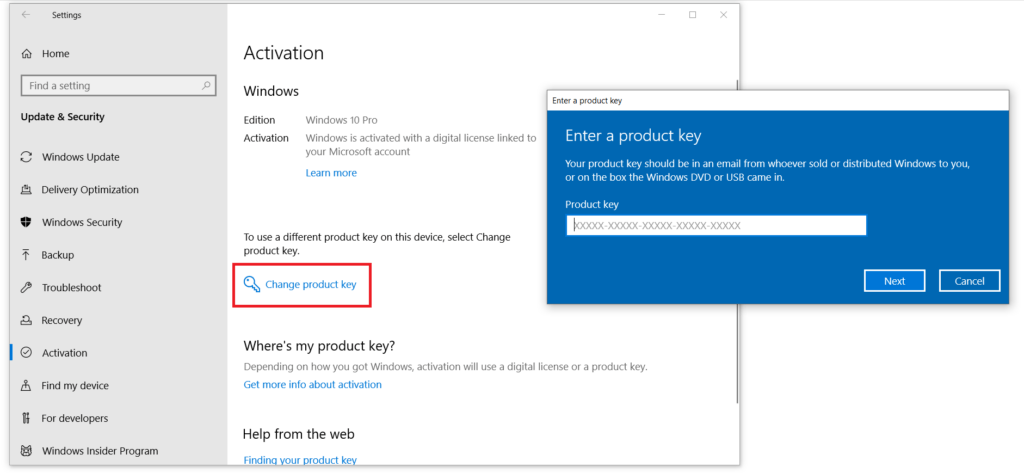
If you don't have a Microsoft account and have a newly purchased key, you can activate it easily from the "Activation" menu. In the Settings window ( + press the I key), search for "Activate" and go to "Activation Settings". Enter your key and click "Next".
If everything goes well, you can check the Windows activation status in the same window, in the first column.
If you have a Retail key, we recommend creating a Microsoft account and signing in. This way, your key will be linked to your account.
2. Activate During Installation
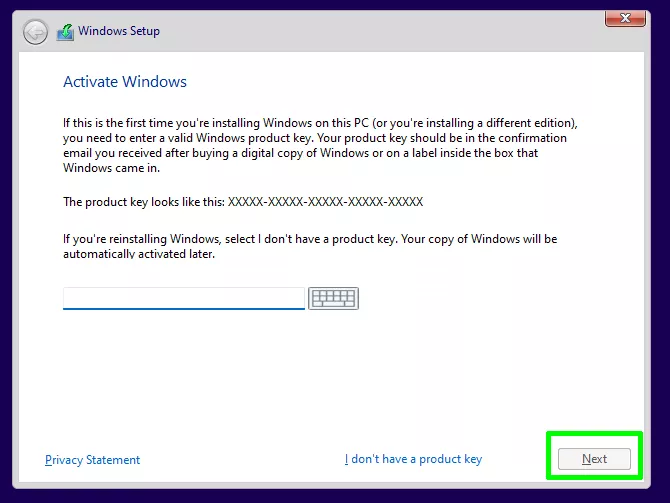
You can enter the key during the Windows installation when prompted. (If it doesn't work, continue the installation without entering the key and try another method afterwards.)
Where to Buy an Activation Key and How Much Does It Cost?
You can purchase Windows keys online directly from our website. Immediately after payment, you will receive your key via email.